


Hometown Gate
4.215.00 Reviews
App Specs
- Version
- 4.9.0
- Updated On
- License
- Free
- Downloads
- 10,000+
- Developer
- HomeTown Ticketing, Inc.
- Categories
- Events
- Platform
- Android
Screenshots
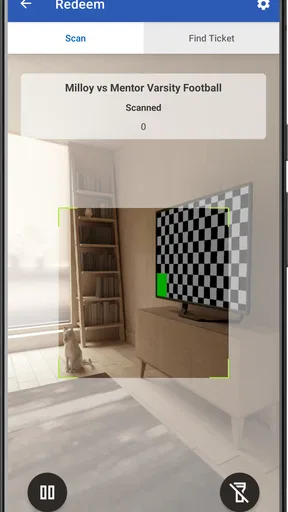
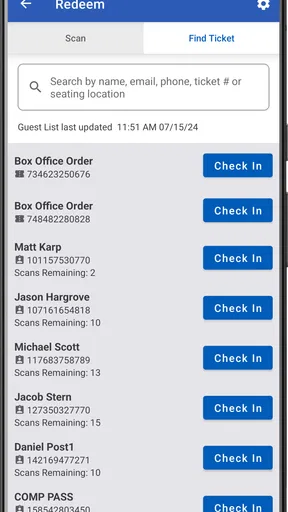
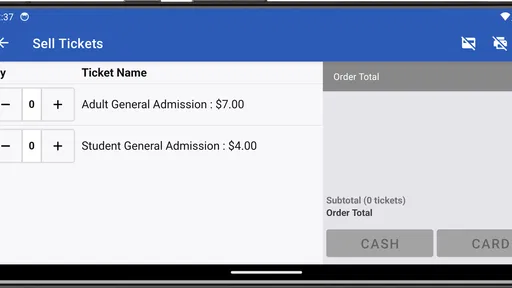
 Analysis by AppCompare
For a school play, a local sports fixture, or a community fundraiser, the moment that matters is often the one at the entrance: a ticket needs to be sold or checked, and the queue is waiting. Hometown Gate is aimed at that practical slice of event work. I see its appeal less as an all-purpose event-discovery app and more as a tool for people handling tickets through a Hometown box office. That distinction matters: it can be useful when your event already uses that setup, but it is not automatically a replacement for every ticketing service or a general guide to what is happening nearby.
Where the connection becomes part of the job
Ticket handling is a time-sensitive task, so connectivity shapes how comfortable I would feel relying on a mobile device at the door. Before an event, I would make sure the phone has a dependable connection and open the relevant workflow while there is still time to deal with a sign-in or loading delay. A calm check before doors open is worth more than discovering a connection problem with a line forming.
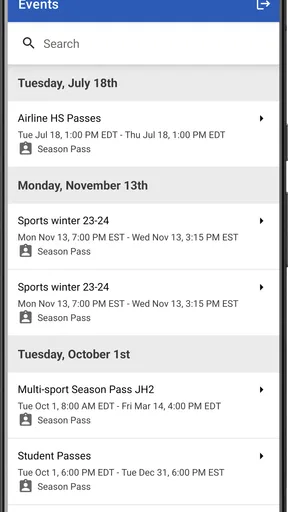
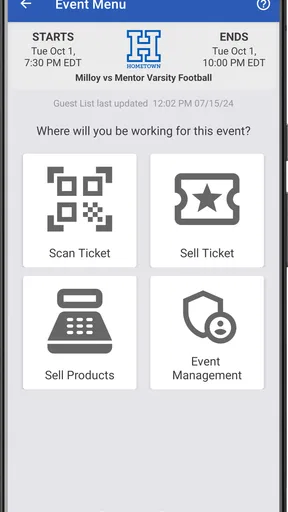
That practical habit also helps clarify what the app is for. HomeTown Ticketing, Inc. makes this free events app for selling and scanning tickets from a Hometown box office. Its focus is operational rather than social: it is for the person helping attendees get through admission, not for browsing neighborhood posts or arranging local clubs. The difference from a broad event app is useful to understand before installing it.
A mobile tool for the entrance, not every event task
I can picture using it at a school performance where one volunteer sells tickets and another checks them at the entrance. The person scanning can keep attention on the attendee and ticket, while the seller handles the separate conversation about entry. That division of labor can make a busy arrival feel more organized, though it depends on the event’s own staffing and setup rather than the app magically removing a queue.
On a small phone, I would prioritize a clear view of the active ticket task and avoid juggling unrelated apps while people are waiting. A dedicated work device may be easier for a venue that handles frequent events; for an occasional volunteer, a personal phone may be more convenient, provided it is charged and ready. In either case, the app’s usefulness is tied to whether the event is already managed through a Hometown box office.
Planning for snags and sensible recovery
If a screen takes longer than expected or the connection drops, I would pause and confirm what the app is showing before trying the same action repeatedly. At an entrance, repeated taps can create uncertainty about whether a ticket was processed, while a quick check with the event lead can prevent a small technical delay from turning into an admission dispute. Keeping a clear line of communication with the organizer is a sensible backup process, not a claim that the app provides a particular recovery mode.
For a seller, the same principle applies: do not rush through a stalled screen just because someone is waiting. Give the connection a moment, check the current state, and follow the venue’s procedure if the device still cannot proceed. I would also agree ahead of time who makes the final call when a ticket cannot be checked promptly. That simple role clarity is especially useful when staff are volunteers who may not use the tool every week.
Worth Reading Before You Choose

EA SPORTS FC Mobile 26 Is a Bigger Football Game, but It Takes Time

Flipboard Shows What News Apps Must Do Beyond the Feed

Switching to Android Auto Means Rethinking Your Driving Routine

Google Calendar Makes a Crowded Week Easier to Manage

Ludo King Makes the Most of the Minutes Between Plans

Baby Panda World Brings Quick Play to Modern Phones, but Its Game Library Feels Busy
Keeping mobile use focused
Because ticket work happens in short bursts, I would open the app for the event task rather than leave it competing with unrelated phone activity. A charged device, a suitable network and a quick pre-event check are practical basics. They do not guarantee a flawless entrance, but they reduce avoidable distractions when staff need to pay attention to people as well as screens.
The app is free and rated for Everyone, which makes it approachable for a wide range of event helpers. It has an average rating of 4.2 from around 56 ratings, and more than 10,000 installs. I treat those figures as useful context rather than proof that it will suit every venue: the deciding question is whether the event’s ticketing workflow actually runs through a Hometown box office.
Who should choose it—and who should look elsewhere
I would consider Hometown Gate if I were helping an organization that already sells tickets through Hometown and needed a mobile way to handle sales or admission checks. It is also a reasonable option for an occasional helper who wants a focused tool for those duties instead of trying to manage ticket work through email threads or a paper list. The app is less compelling for someone who only wants to find events to attend, or for an organizer whose ticket sales are tied to another provider.
Compared with paper lists, a ticket-focused app can make the admission task more direct, but paper may remain a useful contingency if the event team has agreed on how to use it. Compared with a general event calendar, Hometown Gate is much narrower: it is oriented toward ticket operations, not broad discovery. I would choose the tool that matches the event’s actual ticketing arrangement rather than switch systems just because a mobile app sounds convenient.
Getting Started with Hometown Gate
So, you’ve downloaded Hometown Gate, and you’re ready to dive in. The setup process is a breeze. You simply sign up with your email or social media account, and voilà! You’re welcomed into a vibrant community hub. Right off the bat, the app strikes you with its clean, user-friendly interface. It’s intuitive, which makes navigation a piece of cake even for the less tech-savvy among us.
Features That Stand Out
One of the first things I noticed about Hometown Gate is how it brings the community to your fingertips. Imagine having real-time updates about local events, news, and even garage sales. The app is like a digital bulletin board, and it’s perfect for the busy bees who want to stay in the loop without the hassle of endless searching.
Another fantastic feature is the local marketplace. It’s like having a mini Craigslist within your town. You can buy, sell, or trade items with people in your vicinity, which is super convenient and feels a lot safer than dealing with strangers from far away.
Connecting with Neighbors
Now, let’s talk about social interaction. Hometown Gate is not just about exchanging goods and information; it’s about building connections. The community forum section allows you to engage in discussions, ask for recommendations, or even find a local jogging buddy. It’s like having a neighborhood watch group in your pocket.
One feature I found particularly charming is the ability to create or join local clubs. Whether you’re into hiking, book reading, or volunteering, there’s a club for everyone. It’s a great way to meet like-minded folks and make new friends.
Security and Privacy
In today’s digital age, privacy is king, and Hometown Gate takes it seriously. The app has robust privacy settings, allowing users to control what information they share and who sees it. This level of control is reassuring, especially when you’re interacting with people in your community.
All transactions and communications are encrypted, adding an extra layer of security. Knowing that your interactions and data are protected gives you peace of mind while using the app.
Room for Improvement
No app is perfect, and Hometown Gate has its quirks. While the app is generally smooth, there can be occasional glitches, especially when loading images in the marketplace section. However, these are minor hiccups that the developers are actively working to fix.
Another area for growth is expanding the reach. In smaller towns, you might find fewer active users, which can limit the app’s full potential. However, as the user base grows, this will likely become less of an issue.
Final Thoughts
All in all, Hometown Gate is a refreshing addition to my app collection. It’s a blend of practicality and social connectivity, wrapped up in a neat, user-friendly package. Whether you’re looking to get more involved in your community or simply want a convenient way to keep track of local happenings, this app is worth checking out.
For anyone who values community spirit and wants to stay connected with their hometown, Hometown Gate is a game-changer. It’s like having a little piece of your neighborhood in your pocket, ready to explore whenever you are.
What to check before choosing it
The most useful question to ask an organizer before installing is not whether the app looks easy, but whether the event’s tickets are actually managed through the Hometown box office. If they are, Hometown Gate has a clear role. If tickets come from a different system, installing this app alone is unlikely to solve the admission workflow. I would also ask who will handle sales, who will scan tickets, and who should be contacted if a phone cannot complete the task. Those details prevent helpers from improvising under pressure.
There is a trade-off between using a personal phone and setting aside a device for event work. A personal phone is familiar and easy to carry, but notifications, low battery, or switching between unrelated tasks can distract at the door. A dedicated device keeps the job more focused, though it requires someone to prepare and look after it. For a one-off event, assigning a charged phone and a named operator may be enough; a venue with repeated events may prefer a consistent routine so each helper knows where to start.
Use it as part of a simple event routine
For an evening school concert, I would arrive before attendees, connect the device to the network the venue intends to use, and make sure the person responsible for ticket checks can reach the event lead. I would then keep the phone available for the admission task rather than use the busiest few minutes to learn an unfamiliar screen. If the venue has a separate sales point, I would keep the responsibilities distinct and agree how to direct someone who needs help. None of this is elaborate, but it turns a general-purpose phone into a more dependable work tool.
That routine also gives the team a practical answer to a common concern: what happens if the connection becomes unreliable? I would not assume that a ticket can be scanned or sold without a working network. Instead, the organizer should decide in advance how to handle a delay, who can verify the situation, and what process to use if the device cannot continue. A paper record or another agreed method may help a venue, but it needs to be planned and managed carefully so two people do not make conflicting decisions about the same admission.
For data-conscious users, the sensible approach is to use the app for the ticket task and avoid unnecessary phone activity at the same time. A stable connection can matter more than trying to minimize every bit of mobile use during a short event shift. If the venue offers a trusted network, staff can follow its normal guidance; if they are using mobile data, they can check their plan and signal before doors open. I would not treat either choice as a substitute for confirming that the ticket workflow is ready.
How it fits among ticketing options
Hometown Gate is a better fit than a broad calendar when the job is handling tickets tied to a Hometown box office. A calendar helps people see what is on; it does not necessarily give event staff the same operational focus. A spreadsheet or printed list can be familiar for a small gathering, but it may require more manual checking and coordination. A different ticketing provider may be the right choice when an organization already sells through that service. The best comparison is therefore not which app has the longest feature list, but which one matches the event’s existing sales process.
I would be cautious about choosing a ticketing workflow based only on the entrance experience. Organizers should consider who creates and manages the event, how helpers are prepared, and how the team will respond to a network interruption. Hometown Gate’s focused purpose can be an advantage when the wider box-office process is already in place; it is not a reason to move an event’s entire operation without checking that the change suits the people running it.
Version, support expectations, and fit
The current version is 4.9.0, and the app was released on January 12, 2020. It requires Android 8.0 or later, so I would check a device’s operating system before relying on it for an event. The developer is HomeTown Ticketing, Inc. That context is useful for an organizer choosing devices and preparing helpers, especially if older phones are kept for occasional use.
Its 4.2 average from around 56 ratings and its 10,000-plus installs suggest that people have tried it, but those figures do not tell me whether a particular school, venue, or event uses the same setup. I would confirm compatibility with the organization’s ticket process first. For someone who only wants event recommendations, this is the wrong kind of tool; for a staff member or volunteer assigned to ticket sales or entry checks within the Hometown system, its narrow purpose may be exactly what makes it useful.
My connectivity verdict
I see Hometown Gate as a practical, specialized companion for ticket work, with the network treated as part of the operating conditions rather than an afterthought. Its strongest case is an event team that already uses a Hometown box office and can prepare devices and people before the audience arrives. The main limitation is equally clear: connectivity trouble can interrupt a time-sensitive job, so teams should have a human point of contact and an agreed response rather than expect the phone to solve every entrance problem.
If I were volunteering at a single event, I would use it only after confirming the organizer’s workflow and checking that the device is ready. If I were simply looking for things to do locally, I would choose an event-discovery app instead. For ticket staff who need a mobile way to support the Hometown process, the free app is worth considering, provided the venue plans for the realities of working at a busy entrance.
Pros
- User-friendly interface for easy navigation.
- Local events calendar keeps you updated.
- Connect with neighbors in real-time.
- Customizable notifications for local alerts.
- Supports small businesses with promotions.
Cons
- Limited to specific geographic areas.
- Requires location services always on.
- Occasional bugs in the messaging feature.
- Some features locked behind paywall.
- Frequent updates can be data-heavy.
FAQs for Hometown Gate
What is the main purpose of Hometown Gate?
Hometown Gate is designed to connect users with their local community by offering a platform to share events, news, and services. The app aims to foster community engagement and support local businesses by providing a user-friendly interface for discovering what's happening nearby.
Is Hometown Gate free to use?
Yes, Hometown Gate is free to download and use. However, there may be in-app purchases or subscription options for users who want to access premium features, such as enhanced search capabilities or ad-free browsing. These options allow for a more personalized experience.
Can I use Hometown Gate to promote my local business?
Absolutely! Hometown Gate offers features for local businesses to promote their services and products. Business owners can create profiles, post updates, and engage with the community directly. This makes it an excellent tool for increasing visibility and attracting local customers.
How does Hometown Gate ensure user privacy and data security?
Hometown Gate prioritizes user privacy and data security by implementing robust encryption protocols and strict data handling policies. Users have control over their privacy settings, allowing them to manage what information is shared publicly. Regular updates ensure compliance with the latest security standards.
What are the system requirements for Hometown Gate?
Hometown Gate is compatible with most Android and iOS devices. It requires Android version 6.0 or higher and iOS version 11.0 or later. The app is optimized for both smartphones and tablets, ensuring a seamless experience across different devices. Ensure your device has sufficient storage before downloading.


